Webinar Recording
Webinar Summary
Hey, everybody, thank you for coming to our webinar. My name is Des Byrne from Refill Assistant. Today I’m going to walk through the new common condition Service, software that we have created, and that we are deploying to our first clients this week.
I will have a couple of slides, then I’ll show you a live demo of the product. So, firstly, just to say, I am recording this webinar.
But nothing that you say or type in will be, audible.
All right, without further ado, let me just introduce the company to those who do not know us.
Firstly, we work exclusively with pharmacies in the United States and Ireland. We are based in Cork, – we are an Irish company.
And what we’re all about is about reducing the pain of too many phone calls and too many interruptions coming into the pharmacy. And that’s where we help.
We are an affiliate partner of the IPU.
So how we do this is that we have these multiple online channels, a website and a mobile app. And we make different services available on those tools to help improve a pharmacy’s script ordering, communications, appointment, and now consultation workflow.
If you like, you could think of it somewhat as largely a self-service model whereby a patient will…Access your service online, to order a prescription, to get a reminder, to book a vaccination, fill out an intake form, etc.
And that’s sort of the analogy I would use. So…
Onto the common condition itself. So, initially, the HSE has, gone with these 8 particular conditions.
the thought that it will be increased, I guess depending on the uptake, but so far, my understanding is pretty much all pharmacies in the country have decided to proceed.
And just to give you a sense of the number of people that are impacted, I’ve just put them up here.
Just even when we were looking at this early in 2025, even the end of 2024, when we were looking at the software we felt we’d need to develop, you know, we were trying to get a feeling for how many people are impacted by these, how common are they?
And indeed, you can see there that the numbers are… are fairly high for some of these. The allergies that 26% of people would be… could be affected, cold sores, half, approximately.
And so you can read through that list, but some of that information was on the IAOP, but you can Google all that and find that information and, you know, apply it to your own territory and your own, you know, customer base, and see, you know, how busy is this going to be for you?
I think the challenge for pharmacy is that you’re having to deliver more services with your existing resources, and
you know, that’s… that’s never easy to do, and is always a challenge. So how can you make that, you know, how can you offer the common condition service while making it much more efficient? And I guess that’s where we’re… we’re coming in.
And what we have is a tool, it’s a combination of a software consultation, but also all of the medical intake forms that you would need to get filled out for the 8 different common conditions.
And we have everything that you will need to deliver common condition service consultations efficiently and compliantly from day one. And how we do that is we eliminate the paperwork associated with the common condition, so it’s gone, it’s all done online.
We have a structured common conditions workflow, which I’ll go through in a minute, and the software supports both walk-ins and bookings.
So, walk-ins, somebody walks into the pharmacy and bookings, the product, bill is, up, there’s a…
The consultation software is separate to our booking software if you’re using it, but it actually… there’s an upgrade pack with the booking software, which feeds into the consultation software.
And we estimate, that the time saved per consultation will be somewhere between 5 and 6 minutes using the tool, and that’s just the overall time saving with everything between paperwork, you know, getting a pre-consultation form in, getting all the paperwork done, not having to do the paperwork, sorry, etc.
And not having to go print stuff off and just email it instead.
using Health Mail, that’s the sort of time that you would save on the consultation. So how do we do this?
We have 8 patient pre-screening forms for each of the common conditions.
We have protocol-aligned pharmacist checklist. We have two options for the deployment. There is, a…
Protocol based on the IIOP training, which… and there is a second protocol based on the IPU PAF form.
patient assessment form. The IIOP is shorter than the IPUPAF form.
But they’re the two protocols that we have in place, and you can decide which of those to use. And we have outcome recording, so the different outcomes that can be recorded, such as, you know, a prescription given to the patient, or a referral, etc, that’s all recorded.
There is an integrated prescription generator, so you can fill out the information associated with the prescription, and it will generate both a printed
and a Healthmail version of the script that you can copy and paste into Health Mail and send it to, fulfill your obligations according to the rules.
Once the consultation record is completed, it becomes immutable in our system.
Meaning that it can’t be changed.
And it is then part of our audit log.
And for those of you who have used our tools before, the audit log is where you can find and search for information associated with anything that’s in our system.
And there is a full… the full audit and GDPR compliance trail. That’s how we do it.
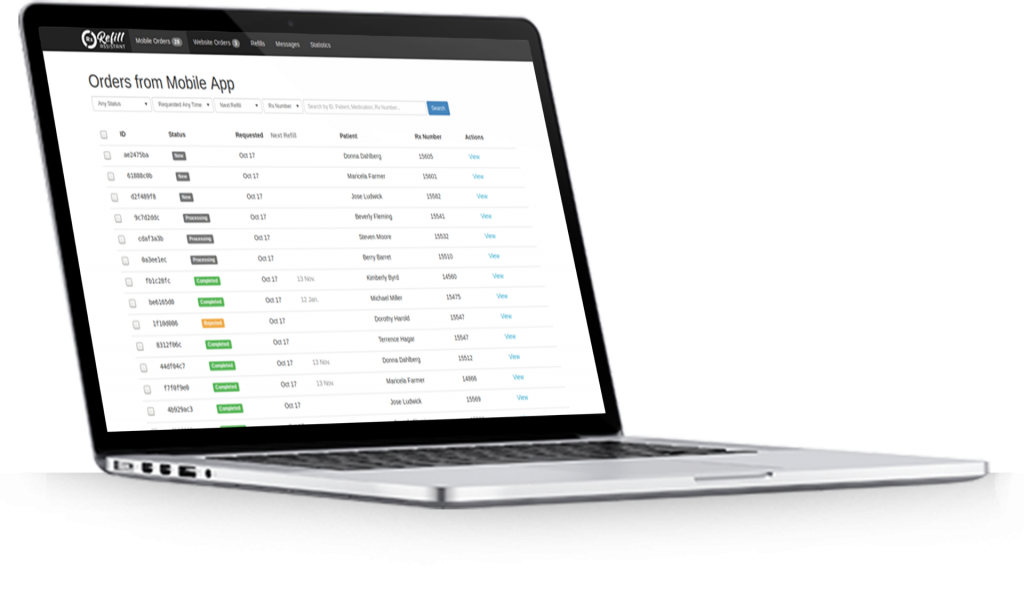
So, again, if you know our system, you will know a screen that looks like this, that black bar at the top. You will notice on the right-hand side of the screen, there is a consultations tab. That consultation tab, when clicked, will open up the consultations that are currently in process, be they completed.
whether they’re in process, and to start a new consultation for a walk-in, all you have to do is press that button, and it’ll open up a consultation form. You select the condition, you input the patient information.
And you, do the consent on their behalf with a patient walk-in consent.
I’ll show you in a minute.
And as I said earlier, the system does
build on the booking engine in that we’re able to take those consultation form questions and backfill them into the booking engine. So the booking engine gets an upgrade, essentially, when you subscribe to the consultation software.
And the patient… the patient can then book an appointment or register, and they will then be presented with a pre-consultation form to complete.
And that pre-consultation form then makes it more efficient in the pharmacy.
Oops, sorry, excuse me.
When they come in for their consultation.
And again, once you have the patient in front of you, then you can just press that button. It’s a new button that you’ll see on the appointment, which is Start Consultation. And once you press that start consultation, then it’ll open up the consultation, the appropriate one.
It’ll show you all of the information the patient has inputted, their name, consent, etc.
And it’ll give you the pre-consultation responses. And again, I will show you that in a minute.
The, key part of this, is a prescription generator, and the prescription generator allows you to input information on the drugs, etc, that you are prescribing.
and then it will allow you to create a prescription that you can copy-paste into HealthMail to fulfill your obligations. You’ll also be able to print it, and I’ll show you that in a second.
That’s… that’s just a quick overview, and I’m going to walk through the product now and give you an overview of it. So…
Just to say that this particular instance, this server, is our pre-production server. The product went on the production server earlier this week, and our first customers are being deployed, okay?
So yeah, to… the first thing to note is the consultation tab, which will be made available.
And when you click on that, then it opens up the different consultations that are being undertaken, and it also allows you to start a new consultation for a walk-in, for example. So let me just do that and show it to you for a second. I’ve done… I’ve pre-prepared some as well, but we’ll just show you this first step.
You can start a new consultation by pressing that button. You pick the condition that the patient is in for.
I’m just going to use this conjunctivitis one.
And you input the patient’s name.
Then put in a date of birth for the patient.
And their address…
And their phone number. I’ve just got these pre-populated, as you can see. And then there’s a consent here, and the consent is what the consent is. It includes information at the…
That they’re confirming that they’ve provided the correct information, the pricing, etc, they understand that, and so on and so forth, and that there’s a consent box that you check on their behalf, which is verbal consent given.
By a parent or guardian.
And then you can begin the consultation by pressing that button down there. So…
This, form then, this opens up the consultation form, and the pre-consultation responses are listed on top.
Followed by the consultation questions below for when they come into the pharmacy. You can add some notes here for yourself.
You can view the signs and symptoms buttons here, for example, and you can show the recommended,
medications that you can, prescribe here. So that’s, and below that, then, are the outcomes.
the additional details, prescriber details, and so on and so forth. And then, at the very last checkbox, this consultation history, which is where we build up that whole audit log for audit and GDPR purposes. So that’s a typical walk-in patient, example.
I’m gonna look then, I’m gonna give you and show you an example of a patient who has,
appointment.
And so, again, let’s say to just go into this one, conjunctivitis one here.
and I click on the view button.
of the actual consultation. And those of you using our appointment system for the vaccinations and shingles, Viagra, Connect, etc, you’ll sort of recognize all of these screens here.
You would see the same…
same buttons and everything, with one exception, which is this consultation button here. So you can either start or view the consultation. I’ve already started this consultation earlier on, but if I view the consultation, then again, I can see all of the information that the patient has entered.
I can show the consent text, etc, that the patient consented to.
And you can look down through the pre-consultation responses here. So these would all have been filled in by the patient here when they’re doing the actual booking, or going… or registering for the consultation. And below that, then, are the consultation responses.
That the pharmacist has completed to complete
the consultation. In this particular case, the consultation is completed, and you can see that the pharmacist has issued a prescription, SNOMED codes, which are these, these codes that are
There, for the different medical conditions, etc.
So they’re also listed, the prescription information along with the prescriber information, etc, and then the consultation history.
To print the script, or… All you have to do is print that, And,
I’ll just continue to print, and you can see it here, that’s what would be printed if you needed to do that and hand it to the patient for whatever reason, or if you wanted to,
generate the prescription for Health Mail, then you will just generate it there, copy the clipboard by pressing that button, and Ctrl-V, or insert, into the Health Mail, and that’s your obligation fulfilled in order to do the Health Mail.
So that was one that I had completed earlier on, but I’ll just go back and have a look for one that is not completed, which was,
Let me see, this one here, this one here,
the last one here. I don’t think this one’s complete, let me just double check on that, yeah.
That one is completed, sorry, one second.
Oh yes, an update I must do, so…
I’ll just update one of these here.
So, again, you can see the questions that these, you will notice this…
I showed… the ones I showed you were the IIOP questions.
this actual one here are the IPUPAF form, okay? So they are longer.
And there’s more questions there, and…
So you can just go through those, typically it’s drop-down, sometimes you have to enter some data, but largely it’s a drop-down.
We’re testing at the moment on this particular server, mandatory, but a lot of these questions will be optional, very much like the PAF form from the IPU. You can add your notes in here, etc.
You can decide what your outcome is going to be, so advice given, OTC supplied, prescription issued, referral, etc.
refer plus initial limited supply. So, prescription issued,
And you can just click on that one. Down the bottom right-hand side, you can see it’s autosaving there.
So it’s always autosaving as we’re going through this. I can look at the recommended medications here, okay, and I can view the signs and symptoms in here.
the right-hand side.
And then just to go through down the outcomes, then you can just…
All these information fields can get filled out.
And if, for example, I wanted to
let’s say, complete the consultation, then it will highlight what I gotta fill out in red. So, prescriber’s name, my health mail.
Prescriber’s phone number, PSI number, the GMS number is not required.
and… let me see if there’s anything else… the medication scheme number…
And the medication quantity, just put in 1 there.
Okay, and save that consultation, and then complete it. So now my consultation is completed, and I can just generate the script, copy-paste that into, Healthmail, and I am done.
So just to, so that’s sort of going through that…
the consultation piece of it as it’s hooked into the appointment system. Then, if I just go over to the right-hand side of the screen, just to highlight that.
This product has been built into our whole technical security infrastructure, so you access the consultation the same way as you’d access an order or an appointment if you’re using those services.
The information is also built into our audit log, so you’ll be able to,
see and look for audit log information. There was me, just generating the prescription, so if you need to find something, you can do it by using this audit log here. So there’s a full traceability of everything in that audit log.
And also, there is a GDPR compliance with these two items here, which are exporting data and restrict processing. These are two things you must be able to do as a pharmacy. If a patient comes in and says, look, please restrict processing my data, or
can you give me an export of everything? Then these functions do that. Just press the button, follow the instructions, and off you go.
Thank you very much for your time and attendance.
If you have any questions, please contact me 021 21 21393. Thank you for attending our webinar. Thank you, and goodbye.
My name is Des Byrne. Thank you for attending. Today I’m going to go through our new product for the Common Conditions Service. I’m
Our name is Refill Assistant. We work exclusively with pharmacies in the US and Ireland, and we’ve been doing that for nearly 10 years. What we’re all about is reducing the pain of too many phone calls and too many interruptions in the pharmacy.
We’re an Irish company based in Cork, and we have team members around the country — Dublin, Galway, Waterford, and Cork itself. We’re an affiliate partner of the IPU, which means IPU members get discounts for our products.
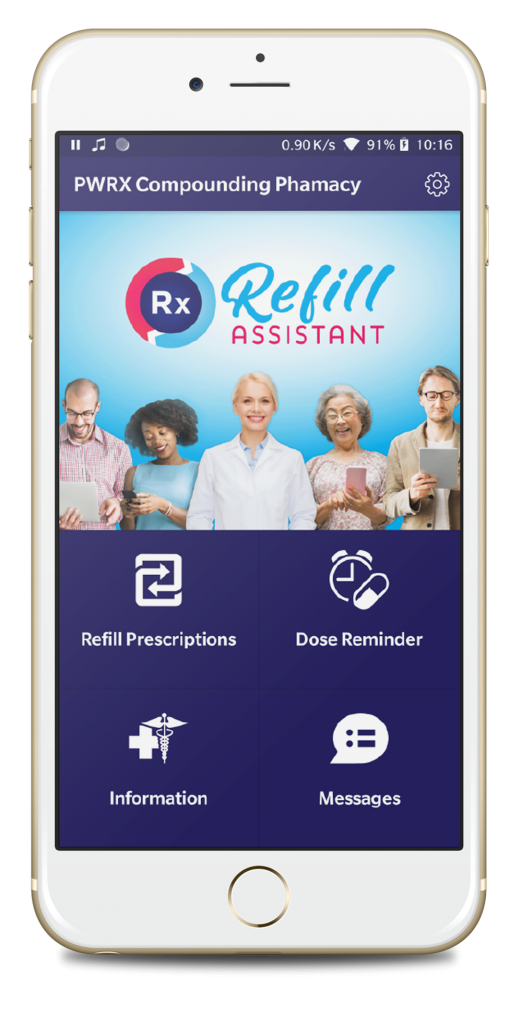
The way we help improve pharmacy efficiency and make it easier in terms of calls and interruptions is through different online channels. We provide a website and a mobile app, and we make pharmacy services available on those channels. That could be vaccination booking, prescription ordering, repeat reminders, and so on.
Those tools together help improve the pharmacy’s script ordering, communications, and appointment workflow. If you think about how it works, it’s like a self-service model for the patient. They can book a vaccination and complete the screening and medical intake form online. You receive it, review it, and then administer the vaccine.
Or they can receive a refill reminder and submit the prescription to you via the mobile app. It comes into our back office system and you can see it there.
And it’s into that infrastructure that we’ve built the Common Conditions Service tool as well — and I’m going to go on to that now.
So these are the eight common conditions that have been defined so far in the documentation — allergies, cold sores, etc. When we were looking at this early last year, we looked at how many people are affected by these conditions.
Just to give a few examples: allergic rhinitis and conjunctivitis — about 26% of people are affected. Cold sores — about 48% of people are affected. Conjunctivitis has a point prevalence of about 6%, meaning at any one time up to 6% of the population could have it. Impetigo is about 12% in children, depending on crowding. Oral thrush is about 5–7% in young and at-risk groups. Shingles has about a 30% lifetime risk. Cystitis and thrush have a lifetime risk of more than 50% and 75% respectively for women.
Those are the kinds of numbers you’ll find if you search online. But you’ll also have your own understanding of what it’s going to look like in your local demographic and the region your pharmacy serves.
The challenge I see — and we hear this all the time — is that pharmacy is expected to deliver more of these services by the HSE, and like all small businesses you’re constrained in terms of resources. You have to do this with existing staff and time.
That’s where we come in and where we help: we have everything you need to deliver Common Conditions Service consultations efficiently and compliantly from day one.
We do that by eliminating consultation paperwork because it’s all done online. We have a structured workflow with pre-screening and then the consultation questionnaire itself, and we support both walk-ins and bookings. We estimate that the complete tool will save about 5 to 6 minutes per consultation — which is significant time within the pharmacy.
So how do we do that?
First, we have patient pre-screening forms — eight of them — and the patient fills out a pre-screening checklist. These can be used with bookings or appointments. Then the patient comes to the pharmacist, and the pharmacist has a protocol-aligned checklist to go through. As they go through the checklist, they can decide the outcome, make notes, and record that outcome.
From there, they can generate a prescription using the prescription generator, which I’ll show you. Once the consultation is saved, you have an immutable consultation record. And like all of our products, we include a full audit trail and GDPR compliance trail. If you ever need to check anything, you have the audit trail. And of course, we are your data sub-processor — we sign a GDPR processor agreement with you — and we have the full security infrastructure including two-factor authentication and support services for GDPR compliance.
The first thing you’ll notice when you use the service is a new tab in the back office. For those who haven’t used our services before, the back office includes mobile orders, website orders, repeats, messages, statistics, appointments, and then consultations.
When you press the consultations tab, it lists all the consultations you’re working through, and you can start a new consultation from there as well. Starting a new consultation opens up a consultation form for a walk-in. I’ll go through that live in a bit.
The walk-in consultation has a slightly different format in terms of consent compared to a pre-booked consultation.
If you’re already using the booking engine for things like flu vaccines, then when you use the consultation tool, we upgrade the appointment system so that it’s populated with the pre-consultation questionnaire as part of the booking.
You can see an example here for a cold sores consultation. When the appointment time arrives, you press Start Consultation and it opens the consultation record for that patient. You can view the pre-consultation responses from the patient, then complete the checklist and outcomes.
One of the outcomes is prescription generation. The tool includes a prescription generator where you add details about the prescription being issued, and it creates a prescription record in the official format. You can copy and paste that into Healthmail.
We’ve also come up with a solution where we expect we’ll be able to open Healthmail from within the consultation record in Refill Assistant — and then all you’d have to do is paste the prescription and send it from within Healthmail.
So that’s the main part of the slides. Next I’m going to show you a live demo.
Before I do that, I’m going to add a poll. The poll is about what information you’d prefer in the assessment form — what kind of questions you want in it, and any other thoughts.
For this webinar today, I’m using the IAOP training information. The IPU ones came out about a week and a half ago and we haven’t put them in yet. But if there are other things you think about, please add them — that would be great.
Okay, let me close the slideshow and I’ll show you the system in operation.
What you’re seeing now is our back office system — we call it the pharmacy portal. I’ve opened it under consultations, and I’m going to run through a walk-in consultation.
If you’ve used the software before, you’ll recognize mobile orders, website orders, repeat reminders, messaging, statistics, appointments, and so on — and now there’s the consultations tab.
If you have a walk-in and you want to start a new consultation, you press New Consultation, then pick the one you want — let’s do cold sores. Again, I’m using the IAOP training data.
You enter the patient’s name, the date (I’m using the 27th just so it doesn’t get mixed up with another one), the date of birth, and the phone number.
The consent for walk-ins is slightly different to the consent if they booked an appointment online. For a walk-in, the patient gives verbal consent, and the pharmacist records that consent here by checking the box. That allows you to begin the consultation.
The consultation opens for that patient. At the top left, you can see the signs and symptoms for that consultation — and that information comes from the official HSE protocol. It gives the pharmacist a quick overview.
When you scroll down, you have the patient information and the pre-consultation responses. You complete those questions — some are mandatory, some optional depending on how the system is configured.
For example: when did you first notice symptoms? Any treatments already used? Current medications? Sensitivities? Anything else the pharmacist should know?
Then you have the consultation questions for the pharmacist. For example: where are the lesions? For a cold sore, outside the mouth. Does it look like a small cluster or one sore? Has it spread? No spreading beyond the lip area.
Then you record the patient assessment — it’s a cold sore. There’s also a differential diagnosis field (a term used in the IAOP training) that can be used or not. Then you have clinical notes.
If you want to add notes, you can show the recommended items and copy them into your notes. Then you select an outcome — for example, Prescription issued.
I can’t show you the prescription generator live today because I’m on a different machine, but you’ll be able to generate the prescription from within the consultation record.
Then you save the consultation, and when you complete it, it becomes immutable — it’s your record for audit purposes. That’s the overview of a walk-in consultation.
Now I’ll show a booked consultation example. Here’s one I created earlier today — a urinary tract infection consultation for someone who booked it. I’m using today’s date to make it easier to view.
The pre-consultation form is visible on your website, and if you use our mobile app it’s also there. The patient picks the consultation, walks through information about the common conditions service, picks a time, enters their name and date of birth, and then starts the questionnaire.
That questionnaire comes into you as the pre-consultation questionnaire. To save time, I already filled one out earlier. When the patient comes in, you can quickly review the answers and start the consultation from within the appointment.
You can view the consent text — the patient already gave consent earlier on your website. Then the pre-consultation questions are already completed, so the pharmacist doesn’t have to answer them again.
You can add notes, then go through the consultation questions — such as temperature, signs of confusion or lethargy, whether they’re an older adult, and then the patient assessment (for example, uncomplicated lower tract UTI).
Differential diagnosis is listed but not mandatory. You also have clinical notes and pharmacist notes, with up to 1,000 characters available. Signs and symptoms are listed at the top.
You can show medication recommendations and copy them into your notes. Then select Prescription issued, save the consultation, and complete it — and it becomes an immutable record.
We’re still working through the IPU documents in terms of those questions — they aren’t fully formed yet and are currently based on IIOP training data.
Thanks to everyone who answered. The feedback is roughly 40% IAOP and 60% IPU assessment forms — which is about what we expected. I’ll share those results with you now.
Now, I want to show two important parts of the system — because when you’re dealing with patient information, prescriptions, and records, two things become really important: audit logs and GDPR.
To reassure everyone: we are intensely aware of and understand security. Everything in our system is encrypted. We have two-factor authentication to log in. We provide everything you need to protect yourself in the event of any issues. We also have cybersecurity insurance.
Audit logging is a big part of it. Everything in our system becomes part of the audit log — staff actions, patient actions, timestamps — and you can find audit information within the system if you ever need it.
From a GDPR point of view, there are a few things you must be able to do remotely. You must be able to export a customer’s data if they request it, and restrict processing if they request it. We have a full process for that — you follow the steps, find the patient, and you can do that.
We have a common conditions roadmap and we’re investing in this long term. There are additional items on the roadmap beyond workflow, prescription generation, and Healthmail integration.
Lorem ipsum dolor sit amet, consectetur adipiscing elit. Ut elit tellus, luctus nec ullamcorper mattis, pulvinar dapibus leo.